

Home


Skrol replaces basic Contacts apps that come with your iPhone or Android with no effort. It compares to those apps the same way a brand-new iPhone compares to a bargain flip phone. The app is free, fast, and easy to use. To learn more, please watch the demo video below.

Skrol replaces basic Contacts apps that come with your iPhone or Android with no effort. It compares to those apps the same way a brand-new iPhone compares to a bargain flip phone. The app is free, fast, and easy to use. To learn more, please watch the demo video below.
Skrol replaces basic Contacts apps that come with your iPhone or Android with no effort. It compares to those apps the same way a brand-new iPhone compares to a bargain flip phone. The app is free, fast, and easy to use. To learn more, please watch the demo video below.
Skrol replaces basic Contacts apps that come with your iPhone or Android with no effort. It compares to those apps the same way a brand-new iPhone compares to a bargain flip phone. The app is free, fast, and easy to use. To learn more, please watch the demo video below.
Skrol replaces basic Contacts apps that come with your iPhone or Android with no effort. It compares to those apps the same way a brand-new iPhone compares to a bargain flip phone. The app is free, fast, and easy to use. To learn more, please watch the demo video below.
Skrol replaces basic Contacts apps that come with your iPhone or Android with no effort. It compares to those apps the same way a brand-new iPhone compares to a bargain flip phone. The app is free, fast, and easy to use. To learn more, please watch the demo video below.
Skrol is a unified contact management platform designed to help you keep your business, social, and personal contacts accurate, complete, and within immediate reach, whether you're a CEO, president, managing partner, board member, high-ranking government official, chief of staff, or executive assistant.
Unlike consumer-grade contact apps, Skrol helps you resolve the following persistent problems:
To ensure immediate access to your contacts from anywhere and at any time, you can use Skrol simultaneously on as many devices as you have with a single set of login credentials. It works on iPhone, iPad, and Android smartphones and tablets. The web version works on Windows, Mac, and Linux computers in Chrome-compatible browsers, similar to Gmail. The other benefits are:

Gradual transitionYou can continue using your current apps alongside Skrol for as long as you like because it connects directly to them and does not interfere with how you already use your devices.

All contacts in one placeSkrol brings your personal, business, and social contacts from multiple sources into one modern app, making them faster and easier to use, especially on a smartphone.

Remote managementSkrol lets your assistant manage your contacts from their computer so they stay up-to-date, organized into groups, enriched with photos and other details, and available on all of your devices.

Memory refresherGroups with photos help you refresh your memory about people you are about to meet by swiping through their profiles, photos, names, and titles in the event group prepared by your assistant.

Full control 24/7Skrol helps you stay in control in urgent situations or emergencies when support staff is unavailable because all the contacts you may need are a tap away in a single app.

Private and secureSkrol helps protect your privacy and security because it connects directly to the original contact sources and doesn't store or mirror your information on its servers.

Easy move to new devicesWhen you replace your phone or computer, you do not need to reimport contacts from the old device, and they do not remain there after you sign out.

Contacts for lifeWhen changing jobs, your personal and social contacts stay with you, while the contacts that belong to your employer stay with them.
A contact management tool is only as good as its ability to connect executives to people inside it. Below are some of the most popular iPhone and Android apps that do just that -- send emails, schedule meetings, make phone calls, send messages, provide directions, find people, empower chats, and enable social interactions:
Contact information sources




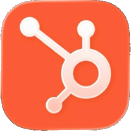

Skrol connects directly to contact information in Apple, Google, Microsoft, Salesforce, HubSpot, Oracle NetSuite, and, optionally, any other platform with an open API.
Email integration


You can create unlimited custom templates for sending personalized emails from your own account right from Skrol to one person, selected people, a group, or everyone.
Scheduling


Skrol is integrated with Apple and Google scheduling apps for adding events and sending invites directly from the app.
Voice, messaging, and chat


Dialer, Messages, and FaceTime interact with Skrol just like with Apple Contacts. Plus you can create personalized templates for texting right from Skrol.
Directions and mapping


You can use all of the above apps to get directions to any address inside Skrol or request an Uber/Lyft ride with a few taps.
Browsers


You can select a preferred browser among the above apps for opening contacts-related web links from inside Skrol.
Search engines


You can designate the search engine of your choice for researching contacts and transferring results back to Skrol.
Chat apps


You can start chatting with anyone directly from Skrol. The app remembers the last service you used to speed up the process.
Social networks


You can connect to anyone's social pages directly from Skrol. If a site supports the share option, you can add them to Skrol with a single tap.
Images and sharing


Skrol is integrated with the Camera, Photos, Clipboard, and AirDrop for sharing and receiving information from other apps and sources.
Interacting with apps directly from Skrol has several practical benefits. You don't have to go through multiple home screens to open them, you don't have to memorize their interfaces, and you don't have to search inside the app for the person you want to contact. Skrol does all of this for you with a single tap on a familiar icon! Equivalent Android apps are supported in the same way.
Skrol comes with comprehensive onboarding and training programs to ensure its immediate usability for executives and their assistants. Additionally, Skrol provides support to onboard a newly hired assistant or add another executive to the team. Here are the key benefits of our support program:

Live supportWe provide executives and their assistants with technical support and guidance by real people for any possible issues that may confront them.

White-glove onboardingWe offer a detailed onboarding experience for executives and assistants to get on with Skrol apps without technical issues.

Seamless contacts importThe app provides tools for importing contact lists from spreadsheets and databases to transition from legacy organizers.

Self-training resourcesWe provide tutorials, guides, and FAQs to help you understand all features and maximize the app's potential.

Customized training sessionsFor organizations, we offer tailored training sessions to meet the specific needs of your executives and their teams.

Regular updates and enhancementsWe continuously update the app based on your feedback to improve functionality and your productivity.
The Skrol app is available for iPhone and Android smartphones, and as a browser-based app, similar to Gmail, for laptops, tablets, and desktop computers.
We recommend starting with the mobile version because it is exceptionally capable and may cover most of your needs.
The browser version is particularly useful for managing large contact databases, organizing groups, maintaining mailing lists, sending personalized emails, and allowing executive assistants to manage contacts remotely. It is also a terrific alternative in workplaces where smartphone use is restricted.



Skrol is a plug-and-play app. No importing, downloading, or synchronization of contact databases is required.
Your contact information remains with its original providers. Skrol accesses it only to display, organize, or update your contacts as you direct. We do not collect, duplicate, store, track, analyze, or sell your information.
You can remove Skrol from your phone or computer at any time without affecting contact information in the original apps.


